How to Downgrade Android Version Safely Using DroidFixHub
This process is done directly through the DroidFixHub app on your Android phone.
Let us keep this simple. If your latest Android update made your phone slow, hot, or buggy, you can move back safely with DroidFixHub.
Why Would You Want to Downgrade?
People usually want to go back to an older Android version for a few simple reasons:
- Performance Issues: New updates can sometimes make older devices sluggish
- Battery Drain: Some updates are not optimized for all devices
- App Compatibility: Certain apps may not work well with newer Android versions
- UI Preferences: You might prefer the look and feel of an older version
- Bug Fixes: Sometimes new updates introduce more bugs than they fix
Step-by-Step Guide
Step 1: Download DroidFixHub
First, download the DroidFixHub app from our website. The app is completely safe to use.
Step 2: Select Version Downgrade
Open the app and tap on the "Version Downgrade" card on the dashboard. This will take you to the version selection screen.
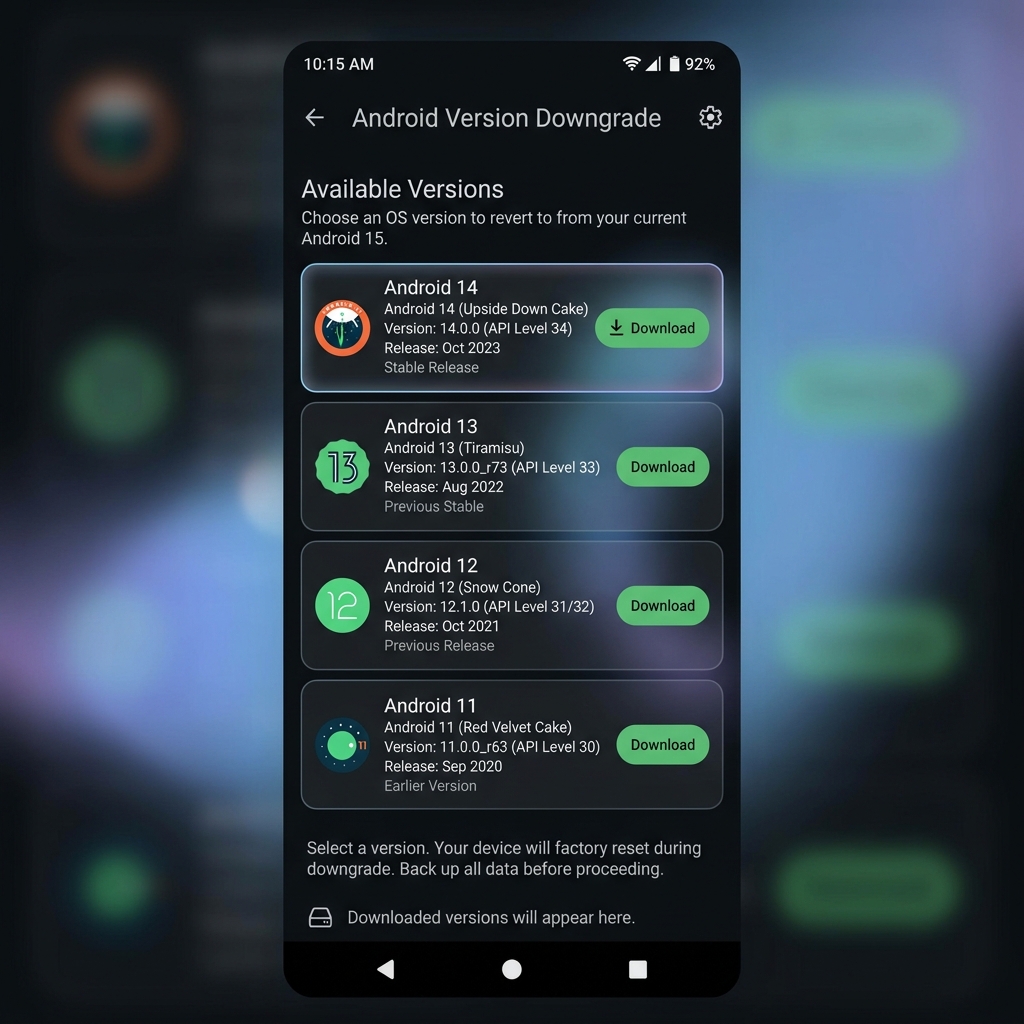
Step 3: Choose Your Target Version
You'll see a list of available Android versions that are compatible with your device. Select the version you want to downgrade to.
Step 4: Follow the On-Screen Instructions
DroidFixHub guides you step by step. The app handles the technical part, so you do not need expert knowledge.
Step 5: Restart Your Device
Once the process is complete, restart your device. Your phone will now be running the selected Android version.
Important Tips
- Always backup your data before downgrading
- Make sure your phone has at least 50% battery
- Stay connected to a stable Wi-Fi network
- The process usually takes 10-15 minutes
Conclusion
With DroidFixHub, downgrading is a few taps, not a stressful process. Simple steps, clear instructions, and safer results.
Download DroidFixHub today and take control of your Android experience!